databasedev.co.uk - database solutions and downloads for microsoft access
Microsoft Access Articles
- General Microsoft Access Articles
- Microsoft Access 2007 Articles
- Tables
- Queries
- SQL
- Forms
- Reports
- Macros
- Modules & VBA
- Data Models
- Downloads
GUI Design
Resources
Online Shop
Info
Microsoft Access Network Username
How to Capture your Network Database User's Name:
Looking for that extra special effect to give your database project a professional flair. Would you like to display your User's names as they log in to the database?
If the answer is yes then carry on reading.........
Step 1. Create a Welcome form: Please see the article entitled Add a Welcome Message to Your Database for details on how to do this.
Step 2. Create the Module shown below: To enable you to automatically pick up the user name from the network login details. This will also automatically pick up stand alone login details (tested on Windows XP).
Private Declare Function apiGetUserName _
                          Lib "advapi32.dll" Alias "GetUserNameA" _
                              (ByVal lpBuffer As String, nSize As Long) As Long

'-------------------------------------------------
' This code is used to retrieve the network user
' name by accessing the API apiGetUserName.
' Created by: Unknown (Found on Dev Ashish
' web site www.mvps.org/access/)
' This code has not been altered in anyway.
' Added to database: 27 dec 1999
' Added by: Richard Rensel
'-------------------------------------------------

Function fOSUserName() As String
    On Error GoTo fOSUserName_Err

    Dim lngLen As Long, lngX As Long
    Dim strUserName As String

    strUserName = String$(254, 0)
    lngLen = 255
    lngX = apiGetUserName(strUserName, lngLen)

    If lngX <> 0 Then
        fOSUserName = Left$(strUserName, lngLen - 1)
    Else
        fOSUserName = ""
    End If


fOSUserName_Exit:
    Exit Function

fOSUserName_Err:
    MsgBox Error$
    Resume fOSUserName_Exit
End Function
Step 3. Add an unbound text box control to your form: Set the Default Value for this control to name of this function: =FOSUserName()
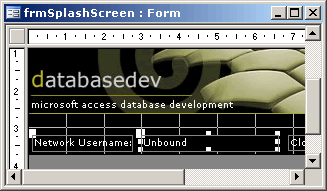
Adding the control to the form to capture the username
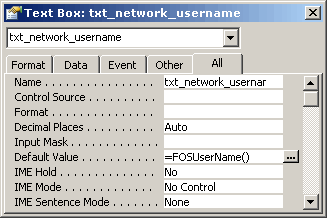
Showing the default value property of the unbound textbox.
Step 4. View your completed form: You should now see the network username visible on the form.
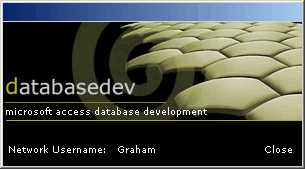
Viewing the completed form including the username