databasedev.co.uk - database solutions and downloads for microsoft access
Microsoft Access Articles
- General Microsoft Access Articles
- Microsoft Access 2007 Articles
- Tables
- Queries
- SQL
- Forms
- Reports
- Macros
- Modules & VBA
- Data Models
- Downloads
GUI Design
Resources
Online Shop
Info
Microsoft Access Modules and Code
Get UserName of User logged into the network or retrieve the current ComputerName in Microsoft Access:
Using the following functions in a Microsoft Access module, you can retrieve the current UserName of the user logged into the network or retrieve the current ComputerName.
modUserName
Option Compare Database


' This code was originally written by Dev Ashish.
' It is not to be altered or distributed,
' except as part of an application.
' You are free to use it in any application,
' provided the copyright notice is left unchanged.
'
' Code Courtesy of Dev Ashish at The Access Web


Private Declare Function apiGetUserName Lib "advapi32.dll" Alias _
"GetUserNameA" (ByVal lpBuffer As String, nSize As Long) As Long

Function fOSUserName() As String
' Returns the network login name
    Dim lngLen As Long, lngX As Long
    Dim strUserName As String
    strUserName = String$(254, 0)
    lngLen = 255
    lngX = apiGetUserName(strUserName, lngLen)
    If lngX <> 0 Then
        fOSUserName = Left$(strUserName, lngLen - 1)
    Else
        fOSUserName = ""
    End If
End Function
modComputerName
Option Compare Database


' This code was originally written by Dev Ashish.
' It is not to be altered or distributed,
' except as part of an application.
' You are free to use it in any application,
' provided the copyright notice is left unchanged.
'
' Code Courtesy of Dev Ashish


Private Declare Function apiGetComputerName Lib "kernel32" Alias _
"GetComputerNameA" (ByVal lpBuffer As String, nSize As Long) As Long
Function fOSMachineName() As String

'Returns the computername
    Dim lngLen As Long, lngX As Long
    Dim strCompName As String
    lngLen = 16
    strCompName = String$(lngLen, 0)
    lngX = apiGetComputerName(strCompName, lngLen)
    If lngX <> 0 Then
        fOSMachineName = Left$(strCompName, lngLen)
    Else
        fOSMachineName = ""
    End If
End Function
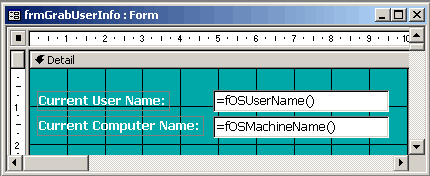
We can then use these functions in a Microsoft Access form for example by doing the following:
In the form, set the control source for unbound text boxes as:
UserName: =fOSUserName()
ComputerName: =fOSMachineName()
There are also other alternatives to finding this information.
There maybe no need to use an API call as the OS maintains the login user and computer name in an environmental string:
- Environ("Computername")
- Environ("Username")
If you are using the Network Login you can use
Me.txtUser = Environ("UserName") to return the UserName of the user logged into the network.
This reads a string value from the operating systems Environment String table if the Network environment is Windows Server or Novell.